






CRM vs Spreadsheets: Which One Is Better for Managing Clients?
Managing clients properly is one of the biggest factors behind sustainable business growth. A company can generate leads, offer a strong product, and invest in marketing, but if client management is weak, valuable opportunities are often lost. Conversations become disorganized, follow-ups are missed, customer history gets buried, and the sales process becomes harder to control. This is why many businesses eventually face an important question: should they continue using spreadsheets, or is it time to switch to a CRM?
At first glance, spreadsheets may seem like a practical way to manage clients. They are familiar, flexible, and inexpensive. Many businesses start by tracking customer names, phone numbers, email addresses, notes, and deal stages in a spreadsheet because it feels simple and accessible. In the early phase of a business, this often works well enough. But as the volume of leads and customer interactions grows, spreadsheets start to show serious limitations.
CRM software, on the other hand, is designed specifically for client and relationship management. It does not just store contact information. It helps businesses track conversations, assign follow-ups, organize pipelines, automate tasks, generate reports, and maintain visibility across the entire customer journey. What begins as a simple comparison between two tools quickly becomes a deeper comparison between two ways of running a business.
The real question is not whether spreadsheets can hold customer data. They can. The real question is whether spreadsheets can support a growing business that wants to manage clients consistently, professionally, and at scale. In many cases, the answer is no. That is why understanding the difference between CRM software and spreadsheets is so important.
Why So Many Businesses Start With Spreadsheets
Spreadsheets are often the default choice because they are easy to access and easy to understand. Most business owners and team members have already used them for budgeting, inventory, reports, or planning. Creating a simple customer tracking sheet feels natural. A company can add columns for name, phone number, email, status, last contact date, next step, and notes. It looks organized, and for a while, it may seem sufficient.
This approach is especially common in small businesses, early-stage startups, and solo operations. When there are only a few leads coming in each week, manually updating a spreadsheet can feel manageable. The business does not yet feel the pressure of larger volumes, multiple sales reps, or complex customer journeys. At that stage, a spreadsheet may appear cost-effective and flexible enough.
Another reason businesses choose spreadsheets is control. They can customize columns, create color coding, filter information, and structure the data in a way that suits their preferences. There is no learning curve tied to a new platform, and there is no monthly software subscription to consider.
These are valid reasons. Spreadsheets are not useless. In fact, they can be very helpful for simple record-keeping or early-stage organization. The problem begins when businesses expect spreadsheets to perform tasks they were never built to handle.
The Hidden Weakness of Managing Clients in Spreadsheets
The biggest weakness of spreadsheets is that they are passive tools. They store information, but they do not actively help teams manage relationships. A spreadsheet can show that a lead exists, but it will not automatically remind a rep to follow up tomorrow. It can list a customer’s name, but it will not show the full history of calls, emails, tasks, and deal movement in one clean record. It can contain data, but it cannot guide action.
This matters because client management is not just about storing details. It is about timing, consistency, and visibility. Sales and customer retention often depend on knowing exactly what happened, what needs to happen next, and who is responsible for it. A spreadsheet struggles to support that in a dynamic environment.
As client volume grows, spreadsheets also become harder to maintain accurately. Multiple people may edit the same file. Notes may be incomplete. Columns may be used inconsistently. One rep may update a status while another forgets. Over time, the sheet becomes cluttered, outdated, or difficult to trust. When the system loses reliability, the business loses confidence in its own data.
Another major issue is fragmentation. Businesses that use spreadsheets often end up storing related information in several places at once. Customer notes may live in the spreadsheet, but conversation history lives in email, tasks live in calendars, and deal updates live in messaging apps. This forces the team to search across multiple tools just to understand one client relationship.
That is where CRM software begins to show its real advantage.
What a CRM Does Differently
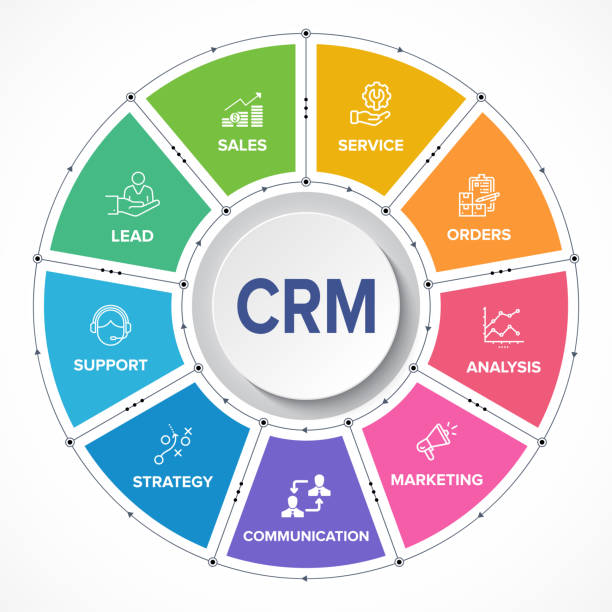
A CRM, or customer relationship management system, is built specifically to manage client relationships in an active and structured way. Instead of acting as a static table of information, it becomes the central hub for sales activity, customer communication, tasks, and reporting.
With a CRM, each client or lead has a dedicated record. Inside that record, the team can view contact details, conversation history, notes, task reminders, deal status, documents, and previous interactions. This makes the relationship much easier to understand and manage. Instead of jumping between spreadsheets, inboxes, and calendars, the team can work from one organized system.
A CRM also helps businesses manage movement. Leads can be placed into pipeline stages such as new, contacted, qualified, proposal sent, negotiation, and closed. Tasks can be assigned. Follow-up reminders can be created. Emails can be tracked. Automation can handle repetitive steps. The system becomes part of the workflow rather than just a container for information.
This is one of the biggest differences between CRM software and spreadsheets. A spreadsheet stores client data. A CRM helps the business act on client data.
CRM Software Improves Follow-Up Discipline
One of the most important areas where CRM software outperforms spreadsheets is follow-up. In many businesses, leads are not lost because the offer is bad. They are lost because the follow-up is inconsistent. A prospect shows interest, but the business forgets to reconnect. A proposal is sent, but nobody checks back. A customer asks for more information, but the next step never happens.
Spreadsheets offer very little protection against this. A business can manually type in a follow-up date, maybe use color codes, or create filters to sort by urgency. But all of that still depends heavily on discipline, memory, and manual review. If the team gets busy, a spreadsheet does not push back. It simply waits there.
A CRM is different. It can generate reminders, create tasks, show overdue actions, and even automate follow-up sequences. This helps teams stay consistent without relying entirely on memory. That level of structure reduces lost opportunities and improves trust with potential clients.
For businesses with active sales cycles, follow-up discipline is one of the strongest reasons to move away from spreadsheets and into a CRM system.
Visibility and Pipeline Management
Spreadsheets can list leads, but they do not naturally provide a strong visual sales process. A CRM does. This difference becomes more important as the number of opportunities increases.
With a CRM, businesses can see exactly where every lead stands in the pipeline. They can view how many prospects are in early stages, how many proposals are pending, how many deals are close to closing, and where bottlenecks may exist. Managers can review activity without asking each rep for updates individually. Business owners can estimate future revenue with more confidence.
A spreadsheet can be formatted to reflect pipeline stages, but it rarely gives the same clarity or usability. It is harder to scan, harder to update consistently, and harder to turn into real-time visibility. The more active the sales process becomes, the more this limitation hurts performance.
A visual pipeline helps teams prioritize better. It also improves accountability because every opportunity has a status and a next step. That kind of visibility is a major advantage for any business trying to grow systematically.
Collaboration Becomes Much Easier With a CRM
Client management is not always handled by one person. As a business grows, multiple people may interact with the same lead or customer. Sales reps, managers, support staff, marketers, and even finance teams may need visibility into the relationship. Spreadsheets do not handle this very well.
Even when a spreadsheet is shared, collaboration often becomes messy. Notes are inconsistent. Important context is missing. Version control problems may appear. Team members may hesitate to edit or may forget to update at all. The sheet becomes a weak substitute for real collaboration.
CRM software creates a shared environment where everyone can access the same up-to-date client record. Internal notes can be added. Tasks can be assigned. Deal ownership is clear. Activity history is visible. If one person leaves the company or hands off the relationship, the next person can continue with context.
This improves internal efficiency and also improves the client experience. Customers do not have to repeat the same information to different team members. The business feels more organized, which builds trust.
Reporting and Decision-Making
Good client management depends on more than just organization. It also depends on insight. A business needs to know where leads are coming from, how long deals take to close, which team members are following up effectively, and where opportunities are getting lost.
Spreadsheets can generate basic reports, but usually only with manual work. Someone needs to create filters, formulas, charts, and summaries. That takes time and often results in reports that are already outdated by the time they are reviewed. It also depends on the quality of the data entered manually.
CRM software usually includes built-in dashboards and reporting tools. Businesses can see sales activity, conversion rates, pipeline health, lead sources, rep performance, and forecast trends in real time. This helps owners and managers make better decisions with less effort.
The ability to see patterns clearly is a major growth advantage. It allows businesses to fix weak points, double down on strong channels, and coach teams more effectively. Spreadsheets may hold the raw data, but a CRM makes the data far more actionable.
Cost vs Value: The Real Comparison
One reason businesses hesitate to adopt a CRM is cost. Spreadsheets often feel free or nearly free, while CRM software usually comes with a monthly subscription. On the surface, that makes spreadsheets look like the budget-friendly option.
But the real comparison is not monthly price alone. It is value. If spreadsheets lead to missed follow-ups, poor collaboration, slow sales handling, limited visibility, and lost deals, then the hidden cost can be much higher than the cost of a CRM subscription. What seems cheaper may actually be more expensive over time.
A CRM creates value by reducing manual work, improving response times, organizing opportunities, supporting retention, and helping the team close more business. For many companies, even a small improvement in conversion or retention can justify the software investment quickly.
In other words, spreadsheets may cost less to use, but CRM software often delivers far more return.
When Spreadsheets Still Make Sense
There are situations where spreadsheets are still useful. A solo freelancer with a very small number of clients may not need a full CRM yet. A business tracking simple lists or internal reference data may find spreadsheets perfectly adequate. They are also useful for exports, analysis, and one-time planning.
The issue is not that spreadsheets have no place. The issue is that many businesses keep using them long after their client management needs have outgrown them. They try to force a basic tool into a role that requires more structure, automation, and visibility.
A good rule is this: if the business is managing a growing number of leads, handling frequent follow-ups, collaborating across a team, or depending on sales consistency to grow, then it is likely ready for a CRM.
Final Thoughts
So, which one is better for managing clients: CRM software or spreadsheets? For businesses that want to grow, improve follow-ups, maintain visibility, and create a more professional customer experience, CRM software is clearly the stronger choice.
Spreadsheets can work in the earliest stages. They are simple, familiar, and flexible. But they are limited. They do not actively support the relationship management process, and they become harder to rely on as complexity increases.
A CRM offers more than storage. It offers structure, action, collaboration, visibility, and scale. It helps businesses move from manual tracking to a real system for managing clients and opportunities.
For any company serious about better organization, better sales execution, and better long-term growth, the shift from spreadsheets to CRM is often not just an upgrade. It is a turning point.